What is Terraform workspace?
Have you worked with a terraform workflow? like terraform init/plan/apply/destroy with terraform configuration files? If Yes, you are already working with a Terraform workspace. YES. It’s the default workspace you always use.
This allows you to create different, independent states on the same configuration. And because it’s compatible with remote backends, this workspace is shared with your team.
Each Terraform configuration has an associated backend that determines how operations are performed and where persistent data such as Terraform state is stored.
Persistent data stored in the backend belongs to the workspace. Initially the backend only has one workspace, called “default”, so there is only one Terraform state associated with that configuration.
Certain backends support multiple named workspaces, allowing multiple states to be associated with a single configuration.
Terraform Workspace – 10 Basic but Real Use Cases
- Separate environments (dev, stage, prod) using the same code
Use one Terraform codebase and create a workspace likedev,stage,prodto deploy identical infrastructure with different sizes, tags, or configurations. - Safely test infrastructure changes before production
Apply new Terraform changes in atestworkspace first to validate behavior without impacting production resources. - Deploy the same application to multiple customers (multi-tenant setup)
Create a workspace likecustomer-a,customer-beach provides an isolated infrastructure using shared modules. - Manage region-specific deployments
Use a workspace likeus-east,eu-west,asia-southto deploy the same infrastructure in several regions. - Executing feature branch infrastructure tests
Developers create temporary workspaces such asfeature-loginto test the infrastructure associated with a feature before merging the code. - Isolate developer sandbox environments
Every developer uses a workspace likedev-rajesh,dev-amitto safely test infrastructure changes without affecting others. - Maintain separate state files for the same infrastructure pattern
Each workspace automatically maintains its own Terraform state file, avoiding conflicts between deployments. - Blue-Green deployment environment
Create a workspace likeblueAndgreento deploy parallel environments and redirect traffic during release. - Run infrastructure performance or load test environments
Use aloadtestworkspace to run temporary large-scale infrastructure for performance testing. - Temporary infrastructure for training, demos or laboratories
Create a workspace liketrainingordemoto provide short-lived infrastructure without affecting production status.
Some workspaces are currently supported by the following backends:
- AzureRM
- Consul
- GCS
- Local
- Mantas
- Postgres
- Remote
- S3
In the Terraform version 0.9 release, this concept is known as “environment”. The name was changed in 0.10 based on feedback to the workspace.
Terraform starts with one workspace named “default”. This workspace is special because it is the default and also because it cannot be deleted. If you have never used a workspace explicitly, then you have only ever worked in the “default” workspace.
There are several advantages to using Workspace:
- These features are specified by Hashicorp, so it is possible that improved features may be developed in the future
- They reduce code usage
However, Workspaces also present some challenges:
- This is still an early implementation
- They are not yet supported by all backends
- It is not clear at the time of application (terraform apply) which workspace will be used (terraform workspace show)
Working with Terraform workspaces?
$ terraform -help workspace
Usage: terraform workspace

  New, list, show, select and delete Terraform workspaces.

Subcommands:
    delete    Delete a workspace
    list      List Workspaces
    new       Create a new workspace
    select    Select a workspace
    show      Show the name of the current workspaceCode language: PHP (php)
Demo Code –
So let’s create a new dev workspace by running terraform workspace new dev and then run terraform apply. As we can see below, instead of creating a terraform.tfstate file in the working folder, Terraform creates a new folder called terraform.tfstate.d/dev and put the country file in it.
├── deploy_website.sh
├── instance.tf
├── provider.tf
├── terraform.tfstate.d
│   └── dev
│       └── terraform.tfstate
├── terraform.tfvars
└── vars.tfCode language: CSS (css)
OK so our web server is now live and we are happy with the results, let’s create it and move on to the prod workspace. So we ran the new terraform workspace product. This automatically puts us in the prod workspace.
$ terraform workspace list
default
dev
* prodCode language: PHP (php)
Now let’s run terraform apply again. Note that if we don’t use a different workspace, Terraform will say no change is needed because the remote and local state will match.
├── deploy_website.sh
├── instance.tf
├── provider.tf
├── terraform.tfstate.d
│   ├── dev
│   │   └── terraform.tfstate
│   └── prod
│       └── terraform.tfstate
├── terraform.tfvars
└── vars.tfCode language: CSS (css)
And now we have a prod folder with a new status file. So as we can see above, we can use the Terraform workspace to manage the differences between development, staging, and production.
You can also back up the remote state of each workspace to S3
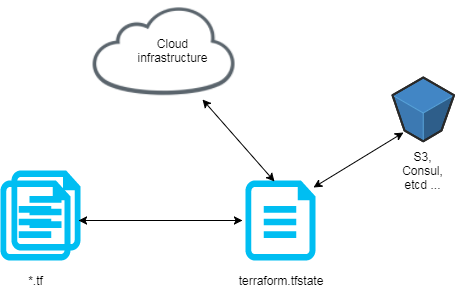
backend.tf:


terraform {
  backend "s3" {
    region = "eu-central-1"
    bucket = "devopsschool.com"
    key = "state.tfstate"
    encrypt = true
  }
}Code language: PHP (php)
Create workspace:
$ terraform workspace new dev
Created and switched to workspace 'dev'
$ terraform workspace new preprod
Created and switched to workspace 'preprod'
$ terraform workspace new prod
Created and switched to workspace 'prod'Code language: JavaScript (javascript)
Select developer workspace:
$ terraform workspace select dev
List of workspaces:
$ terraform workspace list
default
* dev
preprod
prod
Code language: PHP (php)
With this workspace configuration, when a terraform deployment runs successfully, your tfstate will now be stored in the environment folder in either the s3 bucket:
devopsschool.com
env:/
    dev/
       state.tfstate
    preprod/
        state.tfstate
    prod/
        state.tfstate
Terraform Workspace Lab Workflow: Dev, QA, Prod
1. Check the workspace help
terraform workspace
2. Initialize the Terraform project
terraform init
3. Display the current workspace
terraform workspace show
Expect:
default
Code language: JavaScript (javascript)
4. Create a list of available workspaces
terraform workspace list
Code language: PHP (php)
Expect:
* default
Code language: JavaScript (javascript)
5. Create dev workspace
terraform workspace new dev
Code language: JavaScript (javascript)
6. Create qa workspace
terraform workspace new qa
Code language: JavaScript (javascript)
7. Create prod workspace
terraform workspace new prod
Code language: JavaScript (javascript)
8. List all workspaces
terraform workspace list
Code language: PHP (php)
Expect:
  default
  dev
  qa
* prod
Code language: JavaScript (javascript)
9. Choose dev workspace
terraform workspace select dev
10. Confirm the current workspace
terraform workspace show
Expect:
dev
11. Run Terraform for Developers
terraform plan
terraform apply
12. Choose qa workspace
terraform workspace select qa
13. Run Terraform for QA
terraform plan
terraform apply
14. Choose prod workspace
terraform workspace select prod
15. Run Terraform for Prod
terraform plan
terraform apply
16. Switch back to Dev
terraform workspace select dev
17. Remove QA workspace demo cleanup
First select another workspace:
terraform workspace select default
Code language: JavaScript (javascript)
Then delete QA:
terraform workspace delete qa
Code language: JavaScript (javascript)
18. Final list
terraform workspace list
Code language: PHP (php)
Expect:
* default
  dev
  prod
Code language: JavaScript (javascript)Sorry, there was a YouTube error.

Find a Trusted Heart Hospital
Compare heart hospitals by city and service — all in one place.
Explore the Hospital
PakarPBN
A Private Blog Network (PBN) is a collection of websites that are controlled by a single individual or organization and used primarily to build backlinks to a “money site” in order to influence its ranking in search engines such as Google. The core idea behind a PBN is based on the importance of backlinks in Google’s ranking algorithm. Since Google views backlinks as signals of authority and trust, some website owners attempt to artificially create these signals through a controlled network of sites.
In a typical PBN setup, the owner acquires expired or aged domains that already have existing authority, backlinks, and history. These domains are rebuilt with new content and hosted separately, often using different IP addresses, hosting providers, themes, and ownership details to make them appear unrelated. Within the content published on these sites, links are strategically placed that point to the main website the owner wants to rank higher. By doing this, the owner attempts to pass link equity (also known as “link juice”) from the PBN sites to the target website.
The purpose of a PBN is to give the impression that the target website is naturally earning links from multiple independent sources. If done effectively, this can temporarily improve keyword rankings, increase organic visibility, and drive more traffic from search results.
Comments are closed, but trackbacks and pingbacks are open.